
How Hard Drive works: Firmware on Disk Platter and PCB
You might be surprised to find out of how a hard drive - as a separate device - resembles computer. Whether the drive is connected to a computer through an external box, or just powered from a separate power supply, the first thing it does is to start booting its own internal program, a firmware that acts just like a computer OS. That disk-service software (or microcode program) must boot itself: instantly, error-free, right off the drive is powered up on the computer's start up.
If the microcode executes all service-commands flawlessly without any errors, and the drive's starting process passes all self-check-tests and initialization procedures, then the hard drive is ready to read and write data, and communicate in the universal digital language with other computer components, operating system, and user software.
Technically, a computer-to-drive dialog is always starts with BIOS tests, and once drive is detected in motherboard's CMOS - it is accepted for the full-time job.
What happens if the internal process of drive initialization by its firmware failed by some reason? Then the CMOS will not be able to identify the failed hard drive. The computer will skip on such drive, and may give you an error message.
Let's take a closer look under the hood of hard drive during its initialization on powering up. A simplified scheme shows the basic drive components that are required to boot the drive.
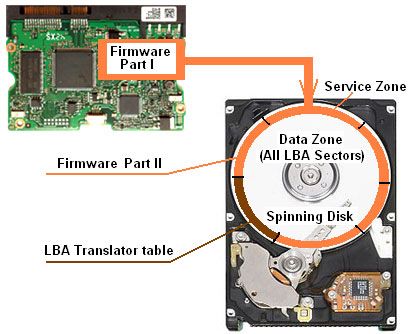
The electronic board, well-known as PCB - Printed Circuit Board (picture above: green part) is the vital part of a Hard Drive. You may consider it as a HDD motherboard with its own processor and RAM. PCB is not only set of chips on the board, it also has a small (but very important) part of hard drive firmware, written in the integrated chips and main PCB processor.
The other bigger part of firmware program is located right on disk-platters inside the drive on special service tracks (pic. brown circle). Every disk inside the drive is covered with high data-density magnetic layers from each side of the platter; one or few disks are stacked on the spindle.
The most part of disk occupied by LBA (Logical Block Addressing) sectors available for computer programs, operating system and user data.
A very small portion of the disk (pic. brown zone) is used for service needs, known as Service Area. That is the place where the rest of internal software is located, designated only to serve for normal and flawless work of the drive. This internal software, or hardware microcode, refers to hard drive firmware, S.M.A.R.T info, the translator module (keeps records about defective sectors or the whole defective tracks, it helps keeping the order in the system of addressing physical sectors to logical-LBA), tuning parameters for heads, and much more.
When the hard drive is powered on, the small part of firmware on PCB is starting the whole process of booting the drive. It sends the command to power on the motor, move the heads over the spinning surface to catch the synchronizing marks to stabilize the speed.
Then the microcode on the service zone starts loading into the drive's memory.
That piece of loaded code from disk platter must be matched to the firmware code from the circuit board. Otherwise, the integrity of the whole drive's software system is violated.
If something goes wrong with loading the whole piece of microcode (on PCB's part or on disk's part), the drive will fail to start normally. The hard drive can stop its motor, or start clicking, or just freeze, i.e. stop responding to any commands from outside.
Generally, PCB is the most dependable part of the hard drive. The most problems come from the damaged mechanical parts, especially, from ultra sensitive heads. The most dangerous condition of the damaged hard drive for its data is the damage to the magnetic layers of the spinning disk platters - as it contains the data.
Some of the hard disk models require the unique firmware burned into original PCB, that's why we require that the damaged hard drive must be presented in one original (parts, labels, etc.) unit for data recovery process. No matter how bad it may visually look to you, the burned PCB must not be replaced by any others from another hard drives, the recovery procedures demand the original PCB only! We will take care of the rest.
Some of the hard drives recovered in Data Lab 24/7
Western Digital WD PASSPORT 1Tb External Crashed hard drive
Drive is not visible on laptop when plugged in, however the device seems to be spinning and light flickers. I tried using replacement cord from drive to laptop, as well as using other laptop to test if drive works, but nothing.
It was successfully repaired. Toronto Downtown
Seagate Backup Plus ST2000LM007 Hard disk parameter error
Failure Symptoms: The drive has a noisy bearing resulting in the operating system NOT being able to see the Hard Drive as a D Drive in another PC. It was booting in Windows just prior to the failure but it takes a LONG time to boot if it boots at all. When the drive is made a D Drive, it may actually fail due to the speed of the motor slowing down as the bearings heat up and increase the friction.
Thank you very much for your services. All data are just fine. Regards, NCR Client Support WATERLOO Waterloo, Ontario Canada