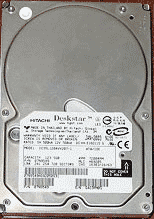
IBM Deskstar 75GXP DTLA-307045 45G Hard Drive
How much does it cost to repair a broken hard drive?
Data Lab 24/7 professionally rescues once-lost data from crashed DTLA-307045 45Gb IBM hard drive. High-quality, fast, efficient service is our creed. We can make it lot easier for you, by keeping tuned in during the recovery process - track it online 24-7.
Data Lab 247 repairs old drives the purpose of pulling data out of damaged unit
Recovering data from old hard drive can be done much faster for specialist, because the smaller capacity of device takes less time to retrieve information from the lesser number of logical sectors with data. Data Lab has large collection of new and older legacy hard drives ready for using as parts in repairing manipulations for data retrieval purposes. Make your mind and have a direct deal with the data recovery specialist. The guaranteed result at fixed and very reasonable rate is verifiable (check below a Result Demo).
| 3.5" Hard Drive (from Desktop PC or MAC) | Regular Service (3-5 days) |
Emergency Service (round-clock) |
|---|---|---|
| IBM Deskstar 75GXP DTLA-307045 45G Hard Drive | $488 | $688 |
Start Data Retrieval Job for this drive right from here
Are you looking for simplicity, clarity and convenience in computer data restoration? Data Lab 24/7 guarantees fast and verifiable result and makes recoverable information more accessible. Technically these two buttons are all your need to start and see the result.

Start Recovery
Estimate the project and get in touch with specialist. Email or print a service ticket.

Click to see the Result
Online File Browser will give you direct access to recovered items. Live demo.